Back to Features Guide
Phase 1: Create New Project
Step 1: Open the Marketing Planner Module
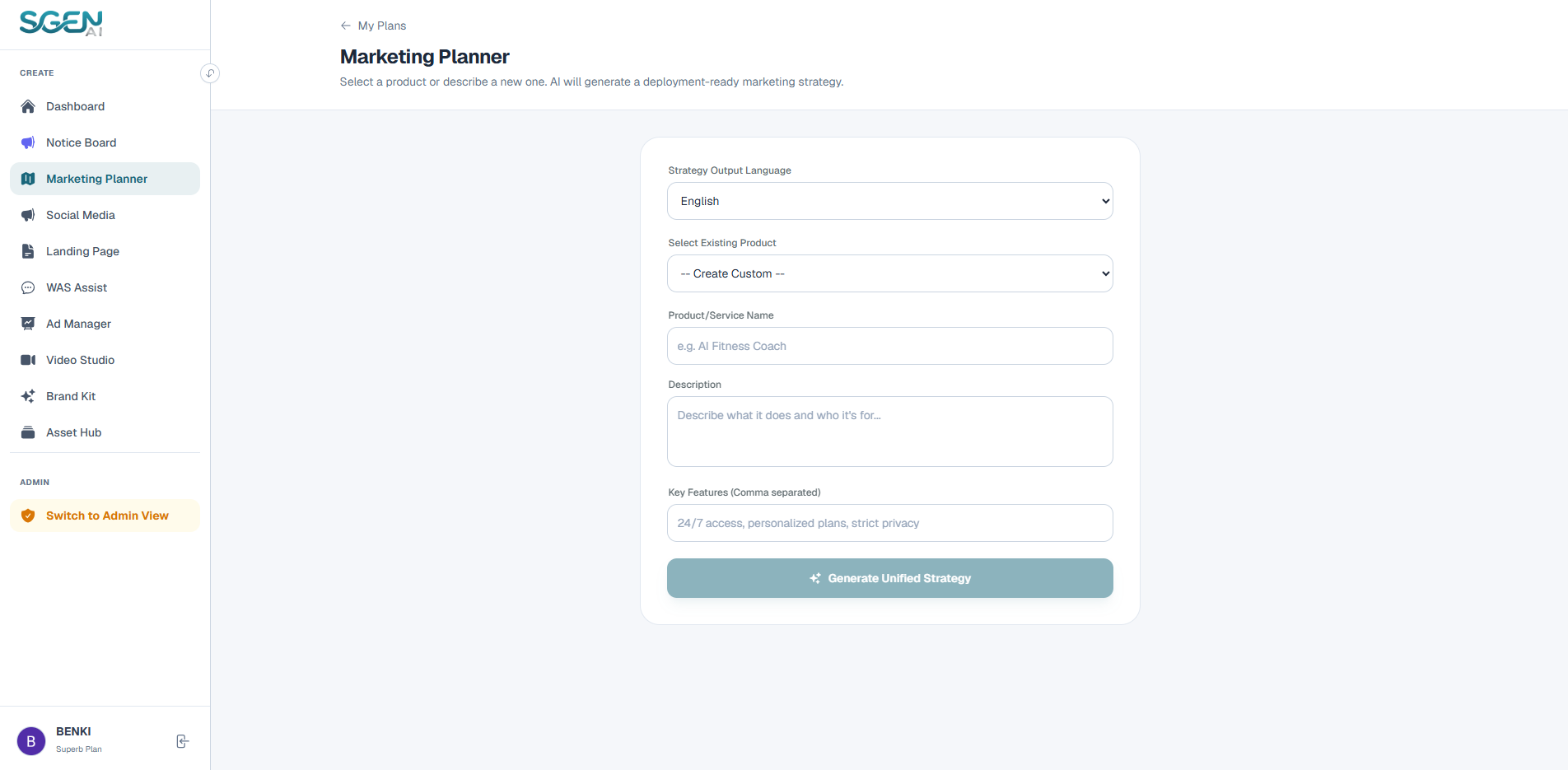
In the left navigation sidebar of your workspace dashboard, click on the "Marketing Planner" option. If you are starting fresh, you will land on the project listings page. Click the "+ Create New Plan" button to launch the configuration wizard.
Step 2: Define Product or Service Information
You can choose between two methods to input data:
• Option A (Recommended): Select Existing Product
Choose a pre-saved item from the "Select Existing Product" dropdown. Sgen AI automatically reads titles, details, and USPs from your Asset HUB database. • Option B: Manually Configure Custom Product Info
Enter your Product/Service Name (e.g., Sgen AI Video Suite) and write a short description outlining what it solves and who it's for. Then add Key Features separated by commas (e.g., One-click video rendering, multi-language captioning).
Choose a pre-saved item from the "Select Existing Product" dropdown. Sgen AI automatically reads titles, details, and USPs from your Asset HUB database. • Option B: Manually Configure Custom Product Info
Enter your Product/Service Name (e.g., Sgen AI Video Suite) and write a short description outlining what it solves and who it's for. Then add Key Features separated by commas (e.g., One-click video rendering, multi-language captioning).
Step 3: Select Strategy Output Language
Click the "Strategy Output Language" dropdown option to set your output translation profile. Sgen AI supports localized English, Chinese, and Bahasa Melayu campaigns.
Step 4: Start Generation
Click the "Generate Unified Strategy" button. Sgen AI will initialize the pipeline and display an loading screen. The AI runs target audience profiles, landing page drafts, video timeline guides, and ad copy (takes 10-20 seconds; do not refresh the page).
Phase 2: Analyze Playbook
Once generation finishes, you are redirected to the campaign Playbook Detail View. Click the 5 dynamic navigation tabs to inspect assets:
Playbook Detail Tabs
- 1. Strategy Inspect target audience segments, user pain points, unique selling propositions (USPs), emotional hooks, and structured copywriting frameworks (AIDA, PAS, or BAB).
- 2. Landing Page View landing page wireframe structures, including headlines, sub-headlines, hero copy, and call-to-action (CTA) text presets.
- 3. Social Media Access 3-5 social media campaign draft options. Copy sets are matched with tag lists (#Hashtags) and descriptive Image Prompts for visual editors.
- 4. Video Scripts Read scene-by-scene storyboard layouts detailing exact visual instructions, narration voiceovers, and CTA timings.
- 5. Ad Copies AccessMeta (Facebook/Instagram) ad text versions containing headlines, bodies, and target hooks.
Phase 3: Manage Saved Projects
View Saved Campaigns History
Whenever you re-enter the Marketing Planner homepage, your past strategy projects will be archived sequentially showing creation timestamps.
Open Details
Click the "View/Open" button next to any saved project entry to instantly load the full strategy tabs again.
Delete Outdated Blueprints
Click the "Trash Icon" next to any project list item and confirm the prompt to permanently remove it and keep your workspace tidy.